Iterable
Iterable (opens in a new tab) is the growth marketing platform that enables brands to create, execute and optimize campaigns to power world-class customer engagement across email, push, SMS, in-app and more with unparalleled data flexibility.
Prerequisites
In order to integrate with Iterable, you'll need to collect the following information:
| Name | Description |
|---|---|
| Domain* | The domain (default = api.iterable.com) |
| API key* | Follow Iterable's Creating API keys (opens in a new tab) documentation to learn more. |
| Webhook ID | The ID of the Iterable system webhook. Required for automatic token refresh of consent webhooks. Found in Integrations > System Webhooks in the Iterable dashboard. Leave as none if not using bidirectional consent. |
Integrating with Iterable
To integrate an existing system with Iterable:
- Navigate to Data map → View Systems and choose the system that you want to connect.
- Click on the Integrations tab.
- Pick the vendor or system type that you want to integrate with from the Integration type drop-down menu.
- Complete the required fields for the integration and click Save.
You may confirm your integration is working using the Test connection button, if desired.
To learn more, please see our guide for Managing Integrations.
When propagating consent preferences, if the user does not already exist in Iterable, Fides will automatically create the user in Iterable before applying their consent preferences.
Bidirectional consent
Before configuring bidirectional consent, confirm that the Iterable system shares a data_use with each of the configured privacy notices. See Ensure data use overlap for details.
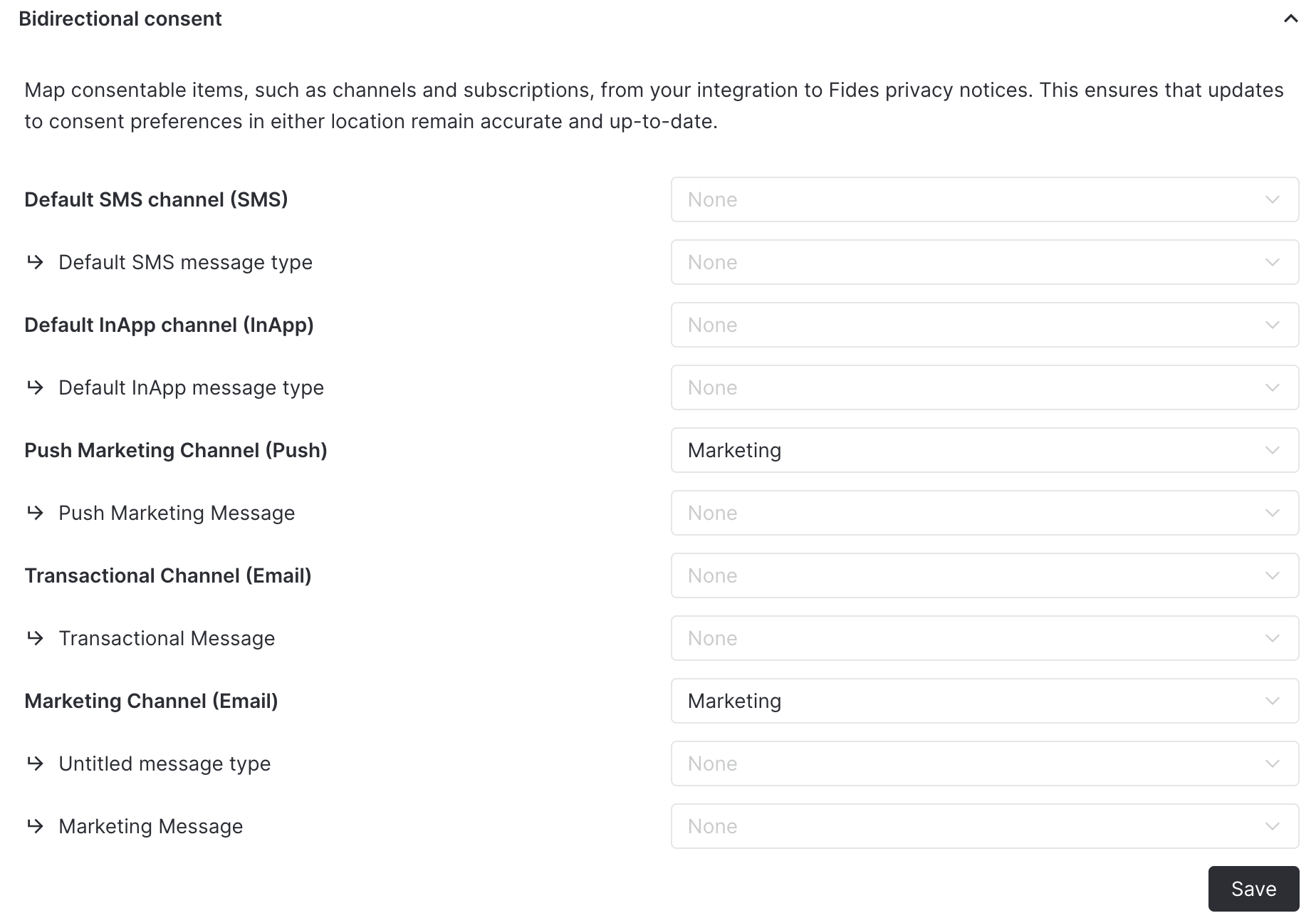
Iterable supports bidirectional consent, which means user preferences are synchronized both ways between Fides and Iterable. To configure this, click on the Bidirectional consent accordion under the Iterable configuration form. This section allows you to map Privacy Notices in Fides to Channels and Message types in Iterable. In the example below, setting Marketing for the Push Marketing Channel and Marketing Channel will automatically subscribe and unsubscribe the user from those channels if they opt-in or out of the Marketing privacy notice in Fides.
Consent webhooks
Iterable supports System Webhooks (opens in a new tab) that can be configured to automatically forward consent preference changes to Fides. When users update their subscription preferences directly in Iterable, these changes can be automatically synchronized with Fides.
To set up consent webhooks you will need to create a System Webhook in Iterable and configure authentication.
Webhook setup
- Within the Iterable dashboard, navigate to Integrations > System Webhooks and click on Create Webhook.
- You will see a Create system webhook modal. The
Endpoint URLshould be the following:
https://your_fides_url/api/v1/plus/connection/{{integration_identifier}}/consent-webhookMake sure this URL is reachable via the public internet.
- Click Create.
- Set the Status to
Enabled. - Set Authentication to
OAuth2. - Set the Authentication Token using one of the authentication methods described below.
- Enable the
SubscribeandUnsubscribeitems from the actions menu. - Finally, click Save Webhook on the form.
By configuring this system webhook, any subscribe and unsubscribe preferences that happen inside of Iterable will be automatically forwarded and stored within Fides.
Authentication setup
Fides supports two authentication methods for Iterable consent webhooks. Automatic token refresh (recommended) handles token rotation automatically, while the static Bearer token approach requires manual token rotation every 90 days.
Option A: Automatic token refresh (recommended)
With automatic token refresh, Fides periodically generates a new webhook authentication token and pushes it to Iterable via the Iterable API. This eliminates the need for manual token rotation. A scheduled job runs daily and refreshes tokens that are within 1 day of expiry.
This feature requires the Webhook ID from Iterable. The Webhook ID is assigned by Iterable when you create the system webhook and is used by Fides to update the authentication token via Iterable's API.
- First, create the system webhook in Iterable by following the webhook setup steps above. You can use the token from step 6 below as the initial Authentication Token.
- After saving the webhook in Iterable, note the Webhook ID. You can find this in the Iterable dashboard under Integrations > System Webhooks — the ID is displayed in the webhook list or in the URL when editing the webhook.
- In the Fides Admin UI, navigate to the Iterable integration configuration.
- Enter the Webhook ID in the integration's configuration form and click Save.
- Generate an initial consent webhook token by calling the Fides API:
GET /api/v1/plus/connection/{{integration_identifier}}/consent-webhook/token - Set this token as the Authentication Token in your Iterable webhook configuration. From this point forward, Fides will automatically refresh the token before it expires.
The automatic refresh job runs daily at 2:00 AM UTC. Tokens are refreshed when they are within 1 day of expiry. The default token lifetime is 90 days and can be adjusted via the FIDES__SECURITY__CONSENT_WEBHOOK_ACCESS_TOKEN_EXPIRE_MINUTES environment variable.
Option B: Static Bearer token (deprecated)
Deprecated. Static Bearer tokens expire after 90 days and must be manually refreshed. Consider using automatic token refresh (Option A) instead.
- Generate a consent webhook token by calling the Fides API:
GET /api/v1/plus/connection/{{integration_identifier}}/consent-webhook/token - Set the returned
access_tokenvalue as the Authentication Token in your Iterable system webhook configuration. - Leave the Webhook ID field empty (or set to
none) in the Fides integration configuration.
You are responsible for generating a new access token before it expires and updating it in Iterable. If the token expires, consent webhook events from Iterable will fail to authenticate with Fides.
Technical detail
Fides utilizes API endpoints to access the API service for a SaaS application. An API service is the programmatic interface through which Fides can query and update data within an application to access, rectify, or delete personal information. Each SaaS tool will have a unique set of endpoints to enable privacy functions.
Iterable endpoints
In the table below, you can find which endpoints are used for each type of privacy function. Clicking on the endpoint will take you to the documentation for that endpoint.
| Privacy function | Endpoint | Description |
|---|---|---|
| Erasure Request | Forget a user in compliance with GDPR (opens in a new tab) | Deletes the specified user's data from the Iterable project and prevents future data collection about them. In email-based projects, you must forget users by email. |